Main Screen
The first thing you see when you launch Aurora
Welcome to Aurora!#
If you have successfully installed Aurora, you'll be greeted with this screen.
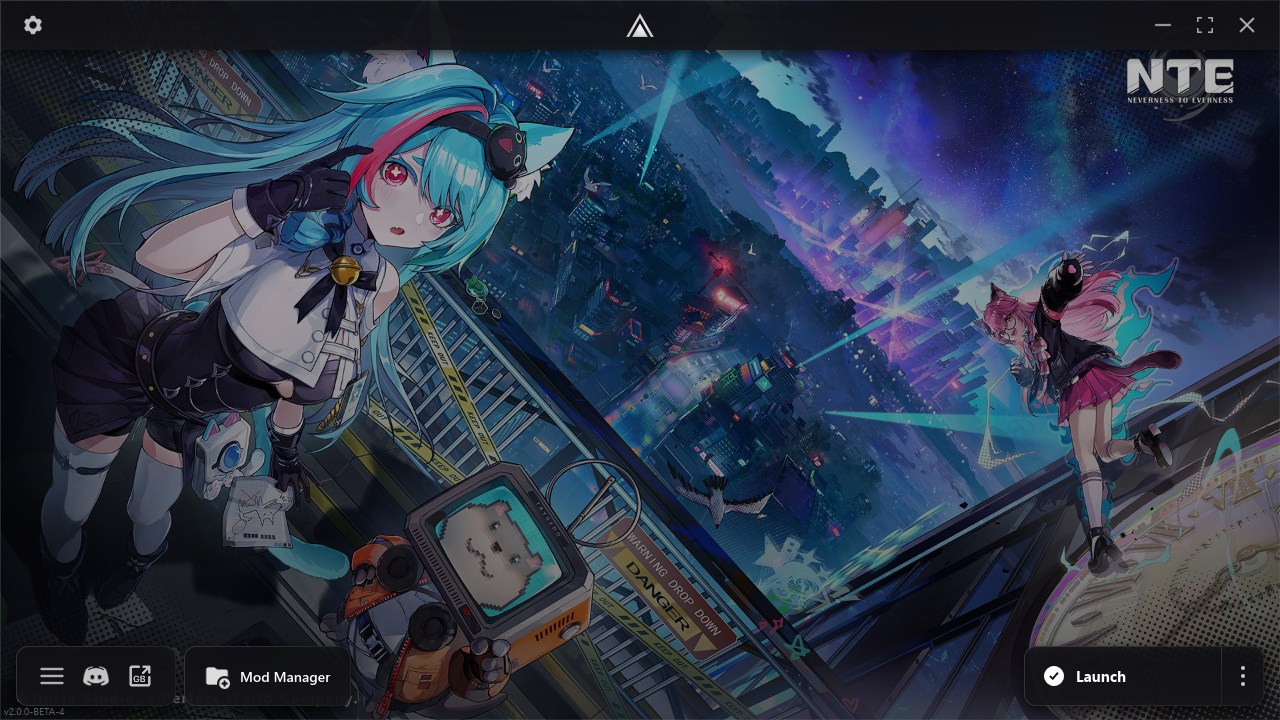
This is the main screen of Aurora. It houses everything you need to actually use it, buttons to navigate to other screens and of course the launch button.
Settings Button#
Available at the top-bar, the cog-like icon is used to open the Settings Page. You can configure how Aurora functions here.
Bottom Row#
The bottom row houses the following elements:
- Aurora Menu — Allows you to open Aurora's menu
- Discord — Allows you to join our Discord server
- GameBanana — Allows you to open GameBanana's website directly
- Mod Manager — Allows you to open the mod manager
Aurora Menu#
Available in the bottom row, the first icon is the button for Aurora's menu. This button allows you to open a variety of other important and useful pages. More info available at Aurora Menu
Mod Manager#
Available in the bottom row, the last button is to open the mod manager. It obviously also has the text "Mod Manager" written on it.
Launch Button#
Arguably the most useful one, it allows you to launch the game with Aurora's engine so mods can be loaded in-game. The triple dot to the right of it also allows you to open a mini-menu with some more useful options like repairing Aurora or checking for updates.
Next#
- Settings Menu allows you to customize Aurora.